
Student Conferences: Maximize the Value of Conference Time

Conferences can be hard.

You have:

  • determined which students need support.
  • communicated, usually multiple times, in order to find a time to meet.
  • held a conference with parents/students/other staff.

Now what?
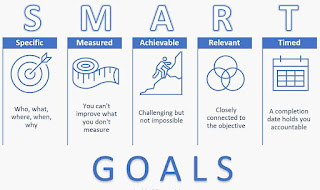
Specific, Measurable, Achievable, Relevant, Time-bound (SMART) goals

First, setting the conference up for success is important. 

See my previous post on managing virtual parent/teacher conferences. 

During the conference, keep the goal in mind. SMART goals, that is. With as much student input as possible, set a short-term goal that is measurable. 

Next, consider these tips to ensure you get the most return on your efforts to meet with students.

1. Manage Your Communication. 

Where possible, you want to build relationships with students. You do this by tracking previous conversations so that each meeting feels like a continuation of the relationship. I use several Google tools to manage my communication with students and families.

google sheets logo

Google Sheets: I use a Google Sheet to keep a list of my students. I use this list to email students my newsletter each Monday. Then, I have columns that record pertinent info, such as IEPs, preferred nicknames, family situations, etc. At conference time, I added a column for communication, which I will cover in more detail below.

google calendar logo

Google Calendar: I schedule my meetings in Google Calendar. Where possible, I have students select the time. This way, Google Appointments will automatically send reminders the day and hour before the conference. If I make the appointment, I also make an email that I schedule to be sent the morning of the conference to remind everyone of our meeting. 

google docs logo

Google Docs: In the calendar invite, I click Take Meeting Notes.
take meeting notes image

This creates a doc with the meeting time and attendees. Before the meeting, I made a few notes and set a few action steps. Then, I copied the link for this doc into the conference column of my spreadsheet. Each time I meet with that student, I return to that doc, make a new meeting note, and continue the conversation. 


2. Communicate the results of your meeting with all involved.

After the meeting, send a quick summary of the goals that were set and the agreed-upon timeline. Remind of tips and tools that will be needed. 

3. Schedule a follow-up.

While you have the person there, decide if you will need to meet again. Often, students will be more diligent in completing a task if they know someone is checking in on that soon. 

A follow-up to a conference can mean a few different things.

Do you need to schedule another meeting? If a conference is exceeding 15-20 minutes, it might be time to offer some goals and a follow-up meeting to check in on those goals. This keeps the student's attention and gives them an opportunity to demonstrate some responsibility for learning. 

Even if you do not set up another meeting, schedule a reminder for yourself to check in with the students and parents on the goals set during the meeting. 

Celebrate all successes. With this robust tracking system in place, you can easily celebrate small wins. Send a card or email when a student meets a goal. Acknowledge that they have gained a grade level since they started meeting with you. Be sure to emphasize the value they have gained for putting in the extra effort.

Conferences can be hard, but they can also be worth it!

“I never said it would be easy, I only said it would be worth it.” ― Mae West. Image of a man on the top of a sunlight mountain.


Comments

Popular posts from this blog

Using AI to Build Support Tools for Students: Pacing Guide Generators and Beyond

In virtual and asynchronous education, one of the most persistent challenges is keeping students on track without daily in-person check-ins. When learners fall behind, they can quickly become overwhelmed, especially when teacher oversight is limited. Enter AI-powered support tools. 🧠 Why AI in Pacing Matters As educators and instructional leaders, we can now customize AI tools to meet our students’ real needs. One simple yet powerful example? ✅ The AI-Powered Pacing Guide Generator This tool creates individualized learning schedules based on each student’s: ✅ Start date ✅ Course length ✅ Available work days 🛠️ What Is a Pacing Guide Generator? A pacing guide generator takes a few simple inputs (course content, end date, skipped days) and automatically produces a custom, student-friendly plan . With just a few lines of code, you can generate pacing guides directly into Google Docs or Google Sheets with minimal effort. 🎯 Use it once, reuse it forever. 💡 Why This Chan...

ChatGPT & Academic Integrity

  The edu-sphere is abuzz with the potential of ChatGPT , both for good and for evil. How should teachers and schools react?  If in the madness of teaching during the holiday season, you missed the coverage of the new chatbot that writes a variety of genres, including essays, lesson plans, and even computer code, you can read more here  and here .  I concur with Matt Miller and others that blocking access to one chatbot is an exercise in futility. For one, filters likely only work on campus networks. Moreover, more chatbot tools will likely emerge as the technology grows in popularity. It would be a waste of manpower to try to keep up with all of them.  What can teachers do, then, but embrace the potential? Embrace, also, the responsibility to incorporate education and model best practices. For instance, MLA and other style guides provide guidelines for citing the outputs of chatbots and other AI tools. Did you use ChatGPT to generate that stellar parent-teache...

AI Tools & Toys to Try

In today's world, Artificial Intelligence has become an integral part of our daily lives.  From education to productivity, audio to video, art to fun tools and toys, AI is making a significant impact in each and every aspect. With AI tools, we can simplify and automate many tasks, make our lives easier, and have some fun while we're at it. In this post, we'll dive into the world of AI and explore some of the most interesting and innovative tools available. So buckle up, grab a cup of coffee, and let's explore the fascinating world of AI tools together! (Intro draft generated with ChatGPT ). The list of possible AI tools quickly becomes overwhelming. Furthermore, tools range from free, to freemium, to paid accounts. I have included a list of some great tools for beginners, with not to various applications for AI for teachers. I have tried out each tool and, where possible, including a sample of what I created in a relatively short amount of time. Each tool included is av...